
3. Documentation + Organization
Table of Contents
Timing
It will take approximately 25 minutes to read and explore this section. The time required to answer the data management plan question will vary.
 Raw data isn’t easy to understand and re-use. Raw numbers in a spreadsheet can be hard to interpret, and variable names might have abbreviations that make it hard for others to understand what it truly is (What did you mean when you made this column “cat2”? Did it mean cat, category, or something else?).
Documentation is an important best practice to make data easier to understand and reuse.
Let’s go through this simple thought experiment to highlight why documentation and organization is so important.
- If you needed to use data you collected over a year ago, how easy would they be to find and use?
- Would you know what all the variables and file names mean?
- Would you have information about when/where/how the data was collected?
- Have you ever gone to analyze data or publish a paper only to find that some critical piece of information was not recorded, or you don’t remember where you wrote it down?
Good documentation and organization helps research reliability, validity, reproducibility, and integrity.
Write Plan: Documentation
Write Plan: Documentation
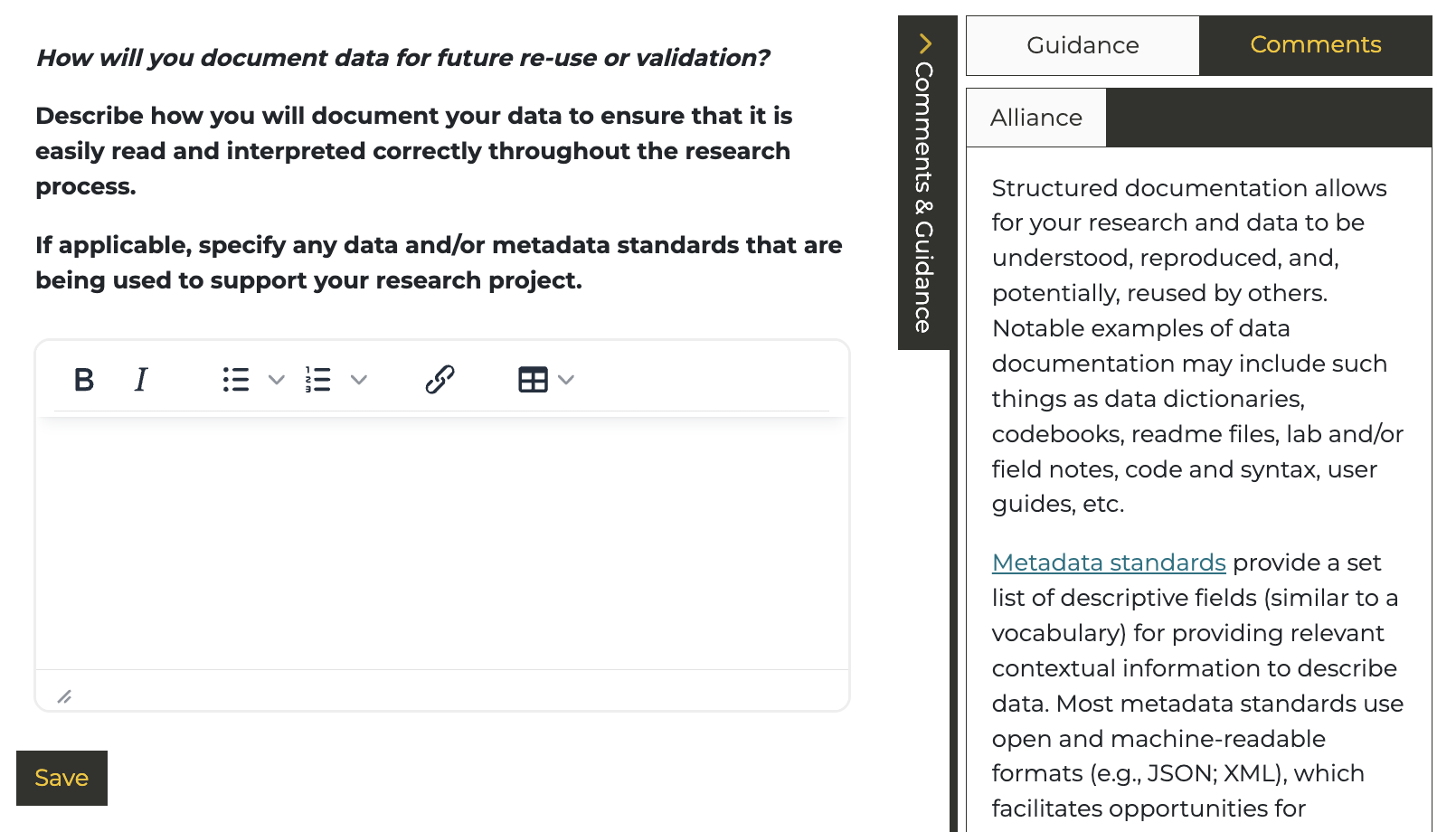
We will now answer the third question, “How will you document data for future re-use or validation?”
Go to DMP Assistant and navigate to the “Write Plan” tab. Open “Plan Questions” and answer the question regarding documenting data.
Make sure you click over to the McMaster University Guidance Sidebar for a reminder of the different considerations in this section.
In this section, you will address how you will create quality metadata and capture information with consistency and accuracy.
3. How will you document data for future re-use or validation?
Use the following prompts to guide you.
- Consider how you will ensure that your data is efficiently documented and captured throughout your project (e.g. scripting, tool-generated, user-documented), including by whom, and identify needs, including staffing resources and expertise, that may possibly be built into your application and supported through grant funds.
- If applicable, specify any data and/or metadata standards that are being used to support your research project.
Reminder! Click “Save” once each question has been answered.
Resources: Research Project Management
To ensure that documentation is created or captured consistently throughout your project, utilize the tools that can support your research and make your life easier. There is no shortage of software that enables collaboration and consistency in the research process. Some examples include Google Docs or Microsoft Word, which enable real-time collaboration between contributors. Reference management tools can also be helpful in managing lists of citations, especially during your graduate research. Refer to the library’s comparison tool for a more comprehensive comparison between the various available options.
- Collaboration
- Google Docs and Microsoft Office lets your team work documents in real-time, avoiding multiple versions and copies sent by email.
- Reference Management
- Zotero, Mendeley, and EndNote support collaboration through shared citation libraries. Zotero is a free open-source resource that lets you take your library with you if you change institutions. McMaster also provides a paid license to EndNote for free for everyone on campus.
- Notetaking Software
- Obsidian, Evernote, OneNote, Notion, or an Electronic Lab Notebook allow you to create organized, linked notes that you can use to document your research practices.
For more information, visit the McMaster RDM webpage on Research Project Management.
Metadata standards and/or tools to document and describe data
Ok, we’ve gotten to the hardest part of the section: metadata and standards. Imagine you are getting some data from your colleague or a secondary data source like an industry partner or statistics. You want to compare newly collected data with those datasets. How do you make sure you are comparing apples to apples and not to oranges? Are there any standards you would want your data to have to make sure it aligns with the best practices of your discipline? What standards–variables, age bins, postal code formats, measurements, coding approaches, archival box number formats–would you want to have in place so the data are relevant in relation to other data?
Metadata is “data about data”. It can include discipline-specific information like measurement abbreviations, geographical information and so on. Many research communities have created their own metadata standards - using a standard helps make your data sets interoperable with the data sets collected by others.
For more examples of metadata standards and further resources please refer to the McMaster RDM webpage on Metadata.
Click here to find out which data files could be included for potential data reuse.
- a description of team members responsible for creating the data- how the data were collected
- a code book (if involving survey data)
- an interview guide (if involving qualitative data)
- any issues affecting data quality
- other relevant background information to allow content to be easily understood
All files containing spreadsheets must include column names which are easily interpreted, even though they will be defined in a code book.
File Organization
While there isn’t one right way to organize files, using a standardized and intuitive method to structure and name your files and folders makes them easier to refer back to in the future. The following are some guidelines that can be followed while naming files:
- The name should briefly describe the contents of the file
- Include a date (as YYYYMMDD or YYYY_MM_DD)
- Include a project name and a version number
- Avoid special characters (like !,@,#,$,%, etc.)
For more guidelines and examples please refer to the McMaster RDM webpage File & Folder Organization.
Something very basic that we sometimes slack on is keeping files organized. The key to organizing files is to make it a habit.
Keeping your files organized makes it easier to know where files are and where new files should go.
- By project
- By researcher
- By experiment type
- By date (often year)
- By some combination of the above
- i.e. a two level structure of year -> project
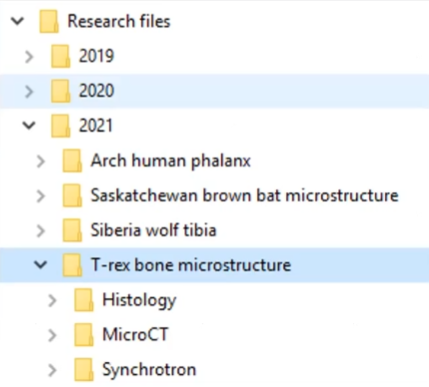
The example above shows files organized by year (2021), followed by project (T-rex bone microstructure), and then experiment type (Histology).
File Naming
Once you’ve come up with a solid folder structure, you can start giving your files good names.
Organizing your research files makes your data easier to understand, share, and archive - both now and in the future. A good file organization system should be descriptive, standardized, and implemented consistently.
Some key things that you might want to include in a file name include a date, a reference to the project, perhaps a short description, and maybe even the initials of the researcher that created the file. Version numbers and even locations are sometimes included as well.
The goal of file naming is to make your files easy to search for, and easy to understand.
All files will use a conventional naming standard. File names should include the grant name (in shortened form), a summary of the file’s content, the region and the date (in the format YYYY/MM/DD).
An example is the following:
prospects_interviewguide_ON_20200617.
Document versions should be named sequentially (with file names ending in v1, v2 etc.).
An example is the following:
prospects_interviewguide_ON_20200617_v1.
Try making your own file name following the example below:
Tip
If you write dates at the start of your files with the year, month, and day (in that order: YYYY-MM-DD), the file system on your computer will automatically organize them by date when you’re sorting your files alphabetically. For example: 2026-01-31
Documentation Files
Once you’ve established a file naming system organized neatly into folders, you can start to think about documentation files. Documentation files come in a number of different formats.
- README
- A simple text document (.txt) that describes folder hierarchy and file organization, description of important file contents, and any other important project information. Make sure everyone on your research team knows the system by walking through the README. An alternative is to write down your file organization system with links in a OneNote page.
- Data Dictionaries
- A document for tabular data that describes names, labels, units, and constraints.
- Codebooks
- Like data dictionaries but for survey or statistical data - includes the survey layout and structure, and codes for questions and answers.
For more detailed information and further resources regarding data documentation, please refer to the McMaster RDM webpage on Documentation and Metadata.
Example README file
You can find a portion of an example README documentation file on the right side.
It starts off with some of the important project information, such as the project's name, the date that the project took place in, a small description about the project, funder information, and finally the researcher's contact information.
It then mentions the file organization system, followed by any naming conventions that the files follow.
Keeping an active README for your project is a key best practice. You can also expand on this with other details such as licenses, related publications, data and file overviews, and methodological information if you share your data.
To generate your own README, you can use the README Generator from McMaster University RDM Services.
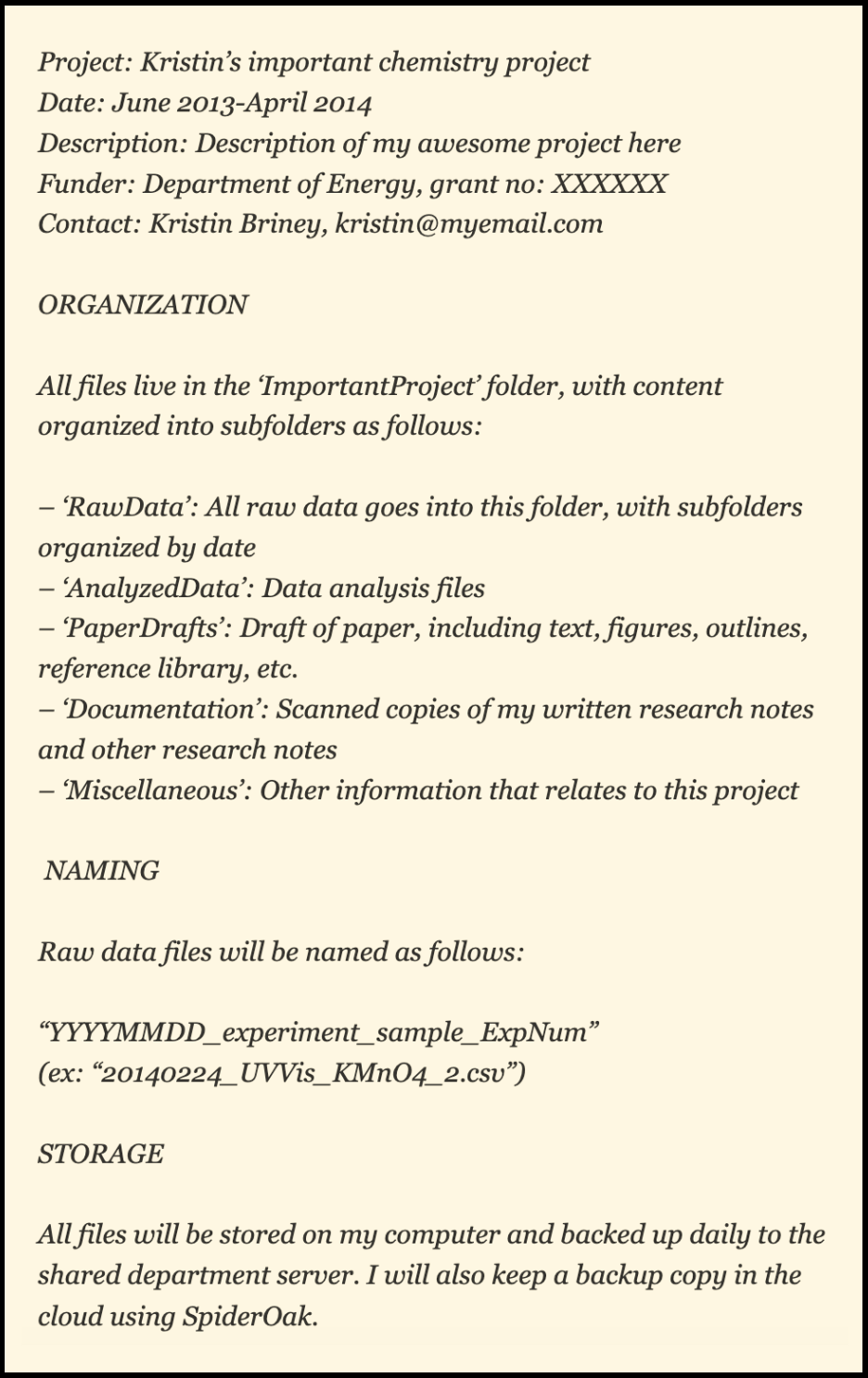 Image credit: Data Ab Initio
 TIP
Build a documentation scheme you will actually use!
The most important aspect of documentation is doing it. If you choose a system that’s too complicated, you’re less likely to follow it. Whatever file naming and organization scheme you choose, make sure it’s descriptive, use it consistently, and document it (in a README.txt file).
Take advantage of the software that is out there, including note-taking software, reference management software, and collaboration software.
DMP Example: Documentation
Here’s how this section looks like in the DMP for “People, Places, Policies and Prospects”.
Documentation
Team researchers engaged in data analysis using software will create logs and syntax files to ensure that the steps leading to the final results are documented and saved. No identifying information of participants may be included in data files. Metadata must also include the grant name and funders (SSHRC and CMHC).
Since these data files will be deposited in the Scholars Portal Cape Breton University Dataverse, the Data Documentation Initiative (DDI) metadata standard will be applied.
Documentation Checklist
After completing the documentation section, review your answer using the rubric to evaluate and strengthen your response.