What is Encryption?
In this chapter, we will introduce the concept of encryption, its relevance in safeguarding research data, how encryption works and the different types of encryption available.
Table of Contents
Lesson Objectives
- Describe encryption
- Know the different types of encryption
Getting started
Have you ever heard of code breakers? Alan Turing, the father of the modern computer, is probably the most famous example of someone who decoded secret messages during WWII, but you may never have heard of Elizebeth Smith Friedman, another cryptanalyst who dismantled a South American Nazi spy ring:
Code breaking is essentially encryption in reverse – both are a form of cryptography. But developing and breaking code isn’t just a military endeavour – if you ever came up with a secret code to pass notes with your friends, you were practicing encryption!
What is encryption?
Encryption is simply using an algorith or cipher to transform information from its original form to a coded form. A simple example is a Caesar cipher where the letters of a text are shifted a certain number of places.
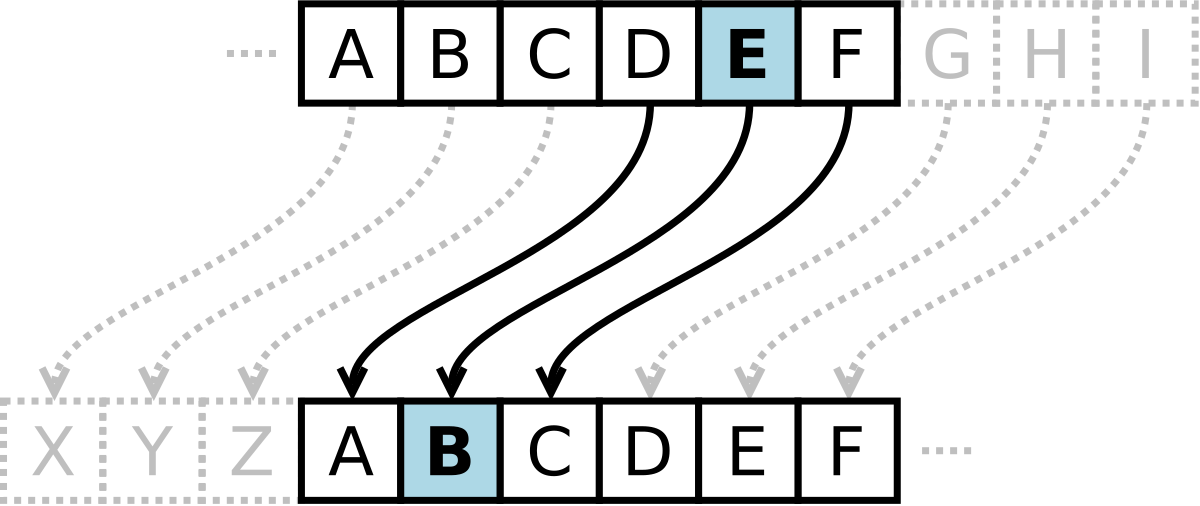
For example, using this cipher to shift letters back 3 places would transform the word
RESEARCH
into
OBPBXOZE.
Importance of encryption in research data management
In research, we use encryption to protect sensitive information. We’ll get into this more in our next chapter, but that usually means personal information, personal health information, sensitive commercial data, or – as in Codebreaker – research with military applications.
Without encrypting data to protect it, sensitive data would be at risk of being stolen and potentially misused. With encryption, even if someone accesses the sensitive data without permission, it remains a jumbled mess (known as ciphertext) without the key to decode it.
How does encryption work?
Think of encryption like a lockbox. The encryption key locks the box, and only someone with the matching key can open it.
The Role of Encryption Keys
Encryption relies on keys – unique strings of bits that lock (encrypt) and unlock (decrypt) data.
- Encryption key: Used to encode the data.
- Decryption key: Used to decode it.
Without the right key, encrypted data is nearly impossible to decipher.
For more information about encryption keys and how they work, explore this TechTarget page!
Types of Encryption
There are two main ways that encryption is applied to data, especially in the context of a storage provider.
- “Encryption at rest” means data is encrypted when it is being stored
- “Encryption in transit” means that data is encrypted while it is being transmitted from your devices to the storage provider.
There are also two main types of encryption: symmetric and asymmetric.
| Symmetric Encryption | Asymmetric Encryption |
|---|---|
| One key is used for both encryption and decryption | Uses two keys: a public key (for encryption) and a private key (for decryption) |
| Both sender and receiver must share the same secret key | Anyone can encrypt with your public key, but only you can decrypt it with your private key |
| Fast and efficient | More secure for exchanging information between parties who don’t know each other |
| Best for encrypting large amounts of data | Slower than symmetric encryption |
| Example Use Case: Secure file storage | Example Use Case: Secure email communication, digital signatures |
Lastly, there are two ways to employ encryption of an entire boot-drive, although only certain software (like VeraCrypt) allows you to implement hidden encryption:
- Normal encryption (sometimes displayed as common or standard) is just that – when you boot your computer, you have to provide the encryption password to finish booting and access your files. The computer cannot be accessed without the encryption password.
- Hidden encryption encrypts your boot drive like normal, but also creates a “decoy” operating system which appears encrypted. When you boot your computer, you can enter the “real” encryption password and boot your hidden, encrypted operating system, or you can enter the “decoy” password, prompting the decoy operating system to boot instead, and keeping your encrypted files completely hidden.
Normal and hidden encryption use the same type of encryption and are equally secure. Using a hidden system is only useful if you are forced to give an encryption password to someone – you can provide the decoy password instead, and maintain plausible deniability about the existence of the hidden files. Most researchers want to use Normal encryption.
Common Encryption Algorithms
| Algorithm | Type | Description |
|---|---|---|
| AES (Advanced Encryption Standard) | Symmetric | Widely used for fast and secure data encryption |
| RSA (Rivest–Shamir–Adleman) | Asymmetric | Common for secure key exchange and digital signatures |
| ECC (Elliptic Curve Cryptography) | Asymmetric | Strong encryption with smaller key sizes—ideal for mobile devices |
| Blowfish | Symmetric | Older, fast cipher for general use. Replaced in many systems by AES |
Key Points / Summary
- Encryption protects your data by converting it into unreadable form. This is important for sensitive research data!
- Symmetric encryption uses one key; asymmetric encryption uses two.
- Encryption keys are the critical component to data safety – never share private keys.
- Common algorithms include AES (fast & secure) and RSA (secure key exchange).
Reflection question:
Interactive activity
Encryption Concepts Match-Up: Drag-and-drop each term to the correct description: